Use the Application Management settings of a role to control what the SysTrack agent records about the applications that run on each system: command lines, application focus history, file paths, and user names.
To open these settings:
Go to Configure > System Configuration > Roles.
Click the lock icon in the upper-right corner to unlock Configure for editing.
Select the role.
From the Additional Settings list, select Application Management.
After you change a setting, click Save Changes.
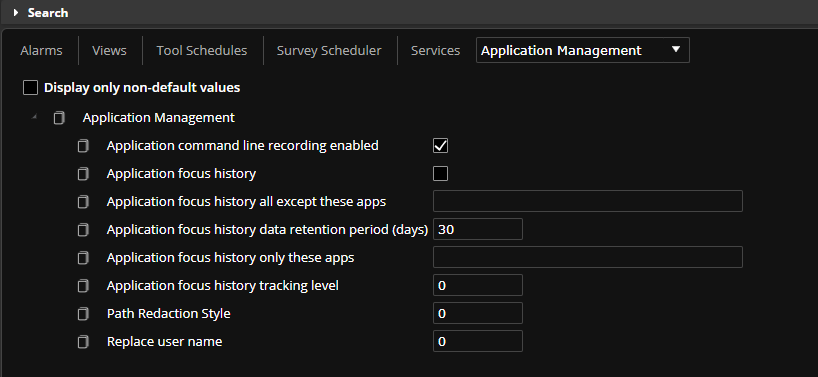
Application command line recording enabled collects the command line of each application, as you would see in Task Manager. The command line displays in Resolve. Selected by default.
Application focus history tracks active application windows and their titles, and the movement between applications. When you turn it on, the agent keeps the active window information, and you can see in Resolve when the user moves between active windows. Cleared by default, because it keeps a lot of data.
Application focus history all except these apps lists the executables that are not recorded when Application focus history tracking level is set to 2. Empty by default.
Application focus history data retention period (days) is how many days the agent keeps focus history data. The default is 30 days. A shorter retention period keeps less application focus history on each system.
WARNING: Systems that use the role delete application focus history older than the retention period at each purge, by default once a day. If you shorten the period, the older data is deleted at the next purge.
Application focus history only these apps lists the executables that are recorded when Application focus history tracking level is set to 1. Empty by default.
Application focus history tracking level sets which window titles are tracked. Enter one of these values:
0: No apps. This is the default.
1: Only the apps in Application focus history only these apps.
2: All apps except the apps in Application focus history all except these apps.
3: All apps.
NOTE: If you set the tracking level to 1 or 2, add the applications to the matching list.
Path Redaction Style removes file paths from the data that the agent collects. Enter one of these values:
0: Off. Paths are kept. This is the default.
1: Remove user directory paths.
2: Remove all paths.
Replace user name replaces user names in collected data, for pseudoanonymization. Enter one of these values:
0: Off. This is the default.
1: Terminal ID.
2: MD5 hash of the account name.
3: MD5 hash of the account name and table.
For more information, see Pseudoanonymization of Sensitive Data.