Use the Health settings of a role to change how the health score is calculated on systems that use the role. These settings override the default health configuration for those systems. You can turn off a health impact category and change the threshold values for each category.
Change the Health Settings for a Role
Go to Configure > System Configuration > Roles.
Click the lock icon in the upper-right corner to unlock Configure for editing.
Select the role.
From the Additional Settings list, select Health.
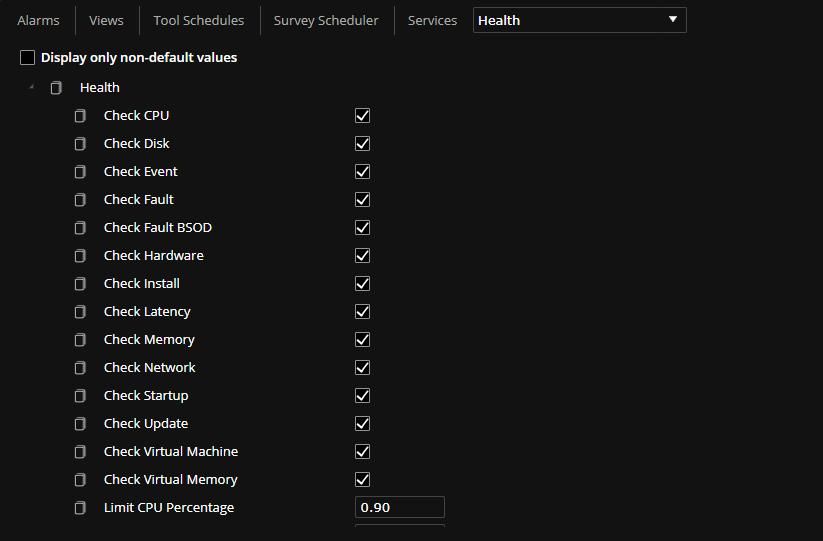
To turn off a health impact category, clear its Check … setting. All Check … settings are selected by default.
To change a threshold, enter a new value in the matching Limit … setting. The default thresholds are in the table below.
Setting
Default
Limit CPU Percentage
0.90
Limit CPU Queue Length
1
Limit Disk Ops
5
Limit Disk Queue Length
1
Limit Disk Queue Time
10
Limit Disk Service Time
20
Limit Disk Time
0.8
Limit Disk Xfer
20
Limit Hardware Percent Interrupt Time
0.10
Limit Latency Gateway
75
Limit Latency Home Directory
100
Limit Latency Sessions
200
Limit Memory
50000000 (agents 10.11 and earlier)
Limit Memory Percentage
0.20
Limit Network Packet Rate
100
Limit Network ReXmit Rate
0.05
Limit Network Utilization
0.7
Limit Startup Application Load Time
5000
Limit Startup Session Time
30000
Limit Virtual Machine Memory Ballooned
0
Limit Virtual Machine Ready Time
5%
Limit Virtual Memory Commit Ratio
0.9
Limit Wifi Signal Quality
50
(Optional) In Health V2 Retention Period, enter how many days health data is kept. The default is 30 days.
WARNING: Systems that use the role delete health data older than the retention period once a day. If you shorten the period, the older data is deleted at the next daily cleanup. Health data that a system has not uploaded yet is lost.
Click Save Changes.
Systems that use the role apply the change the next time they read their configuration. To apply it right away, run Read Configuration on those systems. See Operations: Command Dashboard.
For what each health impact category measures, see Impact Categories.