This page covers uninstalling the SysTrack agent for Windows (Systems Management Agent) from SysTrack Configure or with the msiexec command, and deleting the agent database file.
WARNING: An uninstall removes all agent files, logs, and settings from the system. Only the agent database is kept, unless
PreserveDatais 0.
NOTE: On non-persistent desktops, uninstall the agent on the golden image, then update the image.
Uninstall from Configure
In SysTrack Configure, you can uninstall the agent from Windows systems on the Assignments page.
Go to Configure > Assignments.
Unlock the page for editing.
Select the system and click the X icon next to the list of system groups.
In the dialog box, select one of the following options and click OK:
Set To Uninstall (default): uninstalls the agent and then removes the system from the tree.
Force Removal From The Tree: removes the system from the tree without uninstalling the agent.
WARNING: Force Removal From The Tree removes the system from the tree and deletes all data associated with it. The agent stays installed on the system.
For more information, see Remove Systems from SysTrack Assignments.
Uninstall with the Command Line
On the system, open a command prompt with Run as administrator.
Run one of these commands:
With the MSI of the installed agent version (on the ARM agent, SysTrackCloudEdition_arm64.msi):
msiexec.exe /qn /x "<enter path>\SysTrackCloudEdition.msi" REBOOT=RWith the uninstall command that the installer saves in the registry value
ChildMsiUninstallStringunderHKEY_LOCAL_MACHINE\SOFTWARE\WOW6432Node\Lakeside Software\Deploy(64-bit Windows) orHKEY_LOCAL_MACHINE\SOFTWARE\Lakeside Software\Deploy(32-bit Windows). The command has the formmsiexec.exe /qn /x{<product code>} REBOOT=R.
REBOOT=Rsuppresses restarts and restart prompts. By default,REBOOTis not set.To check the uninstall, open Services and check that Systems Management Agent is no longer listed.
Delete the Agent Database
WARNING: Deleting the agent database is permanent!
By default, the Systems Management Agent (child agent) MSI uninstall does not delete the database file because the MSI does not have a command line argument to remove the database file.
Example: C:\Program Files (x86)\SysTrack\LsiAgent\MDB\collect.sqlite3
However, the child MSI uninstall will delete the database file if a registry value is found.
There are two ways to add the registry value before you uninstall the Systems Management Agent:
Manually add a registry value to the child system’s registry (regedit).
Configure SysTrack Deployment Tool (On-Premises).
Add a Registry Value to Child System
WARNING: With this setting, the uninstall deletes the agent database permanently.
Follow these steps to add a registry value to a child system.
Open the registry (regedit) on the child system.
Create a registry DWORD value named PreserveData and set to 0.
For 64bit OS Registry key:
HKEY_LOCAL_MACHINE\SOFTWARE\WOW6432Node\Lakeside Software\LsiAgent\DeployerSettingsRegistry key (32bit OS):
HKEY_LOCAL_MACHINE\SOFTWARE\Lakeside Software\LsiAgent\DeployerSettings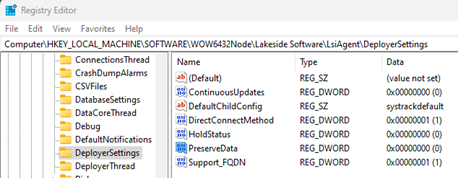
Configure SysTrack Deployment Tool (On-Premises)
WARNING: With this setting, the uninstall deletes the agent database permanently.
Follow these steps to configure the deployment tool for SysTrack On-Premises.
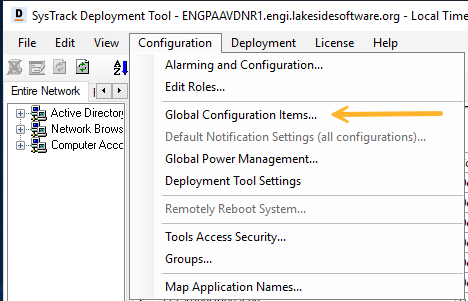
Open SysTrack Deployment Tool and connect to the master server.
Go to Configuration > Global Configuration Items...
Click Tree Settings and uncheck Preserve Data.
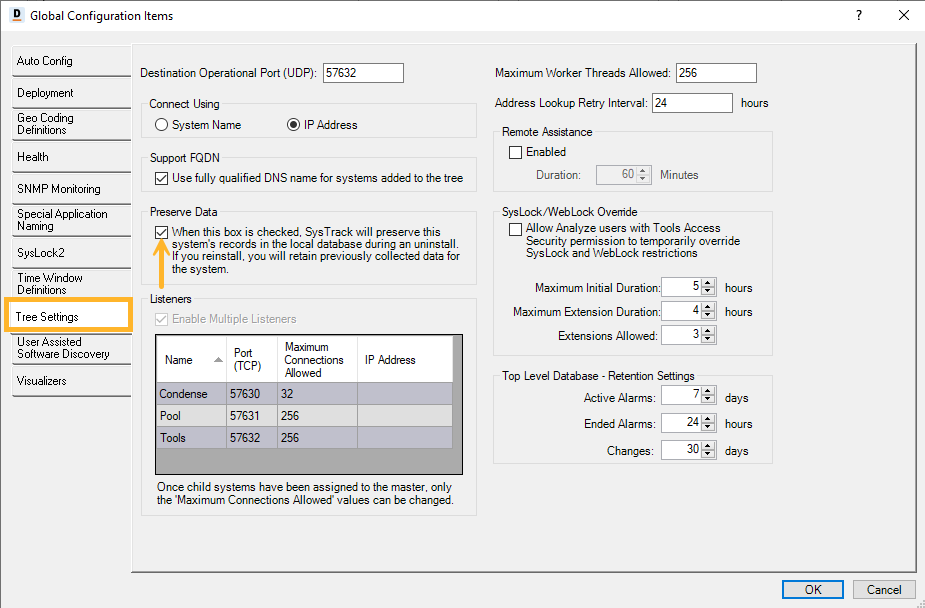
Click OK.
NOTE: It may take a few minutes to add the registry value to the child system.
This change creates a registry (DWORD) value named PreserveData which is set to 0.
After the registry value is added to the child system's registry, you can uninstall the Systems Management Agent and it will delete the database file.