SysTrack supports connection through a proxy: the agent connects to the proxy, and the proxy connects to the endpoint. The agent and supervisor try each step of the connection order until a connection succeeds. When no steps are left, they start again from the first step.
Proxy Settings
The following settings each map to standard proxy usage and operate independently of one another. Because they are independent, multiple settings can be attempted at once without overriding one another. The agent will iterate through these settings in the following order:
AutoDetect: A Boolean value that determines if the web proxy auto discovery (WPAD) protocol will be used to collect a list of proxies to attempt. Set it with
AUTODETECTPROXY(default 0). See Auto Detect Proxy (AUTODETECTPROXY).AutoConfigScript: The string value of the address where a proxy auto-config (PAC) file is located, which can return a list of proxies to attempt. We are only compatible with PAC files. Set it with
AUTOCONFIGSCRIPT(default empty). See Auto Config Script (AUTOCONFIGSCRIPT).HTTPSPROXY: The string value of the <url>:<port> of a proxy to try for HTTPS connections, which is supported by Lakeside Software. If using an HTTPSPROXY setting, you need to specify the port of the proxy itself. For example, if the proxy uses 8080, use the 8080 port. The default is empty. See HTTPS Proxy (HTTPSPROXY).
Connection Order
When the agent requests a connection to the master shortly after startup, the following process takes place. This process stops as soon as a valid connection is made. At any point in this process, if a proxy connection is made, it is saved as the last successful proxy connection.
The agent collects a list of preferred proxy settings. This includes any or all of the above AutoDetect, AutoConfigScript, and HTTPSPROXY settings.
If any preferred proxies exist, the agent iterates through them until a connection is made or there are no more to try.
Next, the agent attempts a direct connection with no proxy.
If no connection is made yet, the agent collects the last successfully used proxy and attempts a connection to that setting. This is a single proxy setting, but could be an AutoDetect, AutoConfigScript, or HTTPSPROXY setting.
If a connection still hasn’t been made, the agent collects proxy settings from the system, which includes any or all of the AutoDetect, AutoConfigScript, and HTTPSPROXY settings. These collections are then saved in case they cannot be collected at some point in the future. Any time a collection is successful, it overwrites the previous collected data.
If collected proxy data exists (either from a fresh collection or a previous collection), the agent iterates through them until a connection is made or there are none left to attempt.
NOTE: From 11.9, a proxy that fails is skipped for 15 minutes. Each connection attempt times out after 30 seconds.
Example 1: Manual Proxy
A company requires all of their outbound network traffic to be routed through a specific proxy. They don't use WPAD or have a PAC file; instead, the proxies are manually configured through group policy.
From an end-user's perspective, the following proxy is shown in the Windows Network & Internet settings in the Proxy tab: 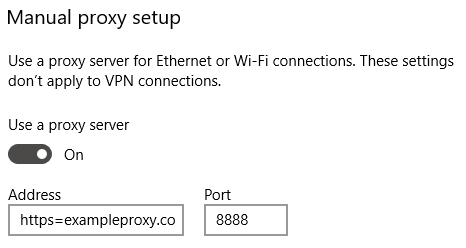
In this case, exampleproxy.company.com:8888 is the proxy that LsiAgent and LsiSupervisor should use.
In order to ensure that LsiAgent and LsiSupervisor use the proxy, the install flag HTTPSPROXY should be used:
HTTPSPROXY="exampleproxy.company.com:8888"Example 2: PAC File and Backup Proxy
A company uses a PAC file to determine how network traffic should be routed. They also push out a proxy through group policy in case access to the PAC file should fail.
From an end-user's perspective, the following proxy is shown in the Windows Network & Internet settings in the Proxy tab:
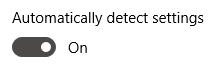
In this case, the autoconfig script is located at http://company.com/example.pac and the backup proxy is exampleproxy.company.com:8888.
In order to ensure that LsiAgent and LsiSupervisor use these values to find a proxy, the install flags AUTOCONFIGSCRIPT and HTTPSPROXY should be used:
AUTOCONFIGSCRIPT="http://company.com/example.pac" HTTPSPROXY="exampleproxy.company.com:8888"Example 3: WPAD Auto-Detection
A company uses WPAD to determine how network traffic should be routed.
From an end-user's perspective, the following proxy is shown in the Windows Network & Internet settings in the Proxy tab:
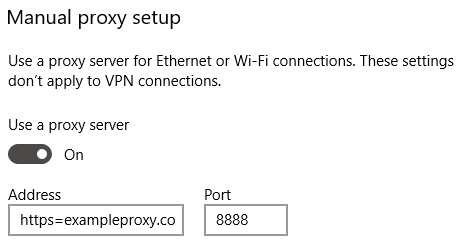
In order to ensure that LsiAgent and LsiSupervisor use the auto detect WPAD protocol, the install flag AUTODETECTPROXY should be used:
AUTODETECTPROXY=1Example 4: No Proxy
A company doesn't require a proxy to communicate outside of its network. No proxy settings are required in the install command line.